All docs pages
The Flow Tab
Flow shows the options prints behind the levels: a market-wide premium overview, a scanner and tracker for notable activity, the live options tape, and dark-pool prints with the price levels where off-exchange volume traded. Everything on it comes from our live options feed and refreshes while the tab is open. It's a Pro feature.
- Open the Flow tab (or go to /flow). The toolbar reads Whale tape · Dark pool · Scanner · Tracker.
- The expiry lens 0DTE / SWING / ALL filters the tape, scanner and tracker. SWING means 7 or more days to expiry.
- Type a ticker and press Apply, or click any ticker on the page, to narrow every panel to that symbol. Index flow narrows to the index symbols.
- The top cards (0DTE, WEEKLY, MARKET TIDE) stay market-wide whatever you filter.
- BOUGHT* and SOLD* are inferred from where the trade executed. Whether a print opened a position is a separate flag; without it the row says Opening / closing unknown.
- Pause updates freezes the page so rows stop moving while you read.
- Educational context only. A print is a record of a trade, not a trade instruction.
The toolbar
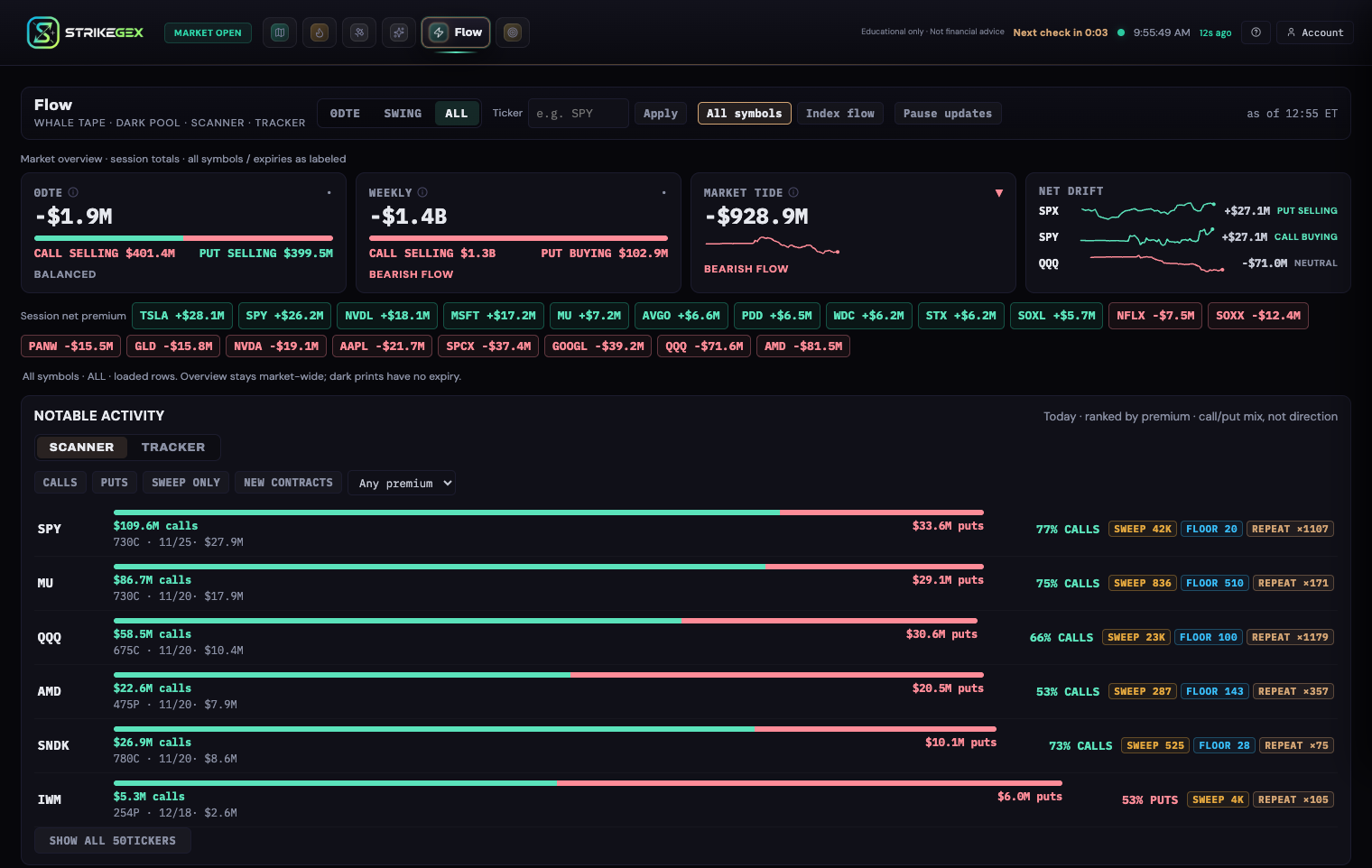
The lens, the ticker box, the All symbols / Index flow switch and Pause updates sit in one row. On the right, as of 12:49 ET shows when the live feed last updated; a · stale mark is added when it falls behind. A note under the overview restates the current scope, for example All symbols · ALL · loaded rows. Overview stays market-wide; dark prints have no expiry.
The lens filters rows the page has already loaded; it never fetches anything new, and the app remembers your choice on this browser. Rows with 1 to 6 days to expiry appear only under ALL. Dark-pool prints have no expiry, so the lens leaves them alone.
Market overview
Four cards sit across the top, labeled Market overview · session totals · all symbols / expiries as labeled.
- 0DTE and WEEKLY show net premium for that expiry bucket: signed call premium minus signed put premium. Each leg is spelled out as CALL BUYING, CALL SELLING, PUT BUYING or PUT SELLING with its dollar amount, colored by what that flow implies for price (call selling reads red, put selling reads green). The bar leans toward the side the net favors, and the card ends with BULLISH FLOW, BEARISH FLOW or BALANCED. An arrow (▲, ▼ or ·) at the top right shows which way the net is moving. The 0DTE card is outlined when the 0DTE lens is on.
- MARKET TIDE is the running session total of net premium across the whole market, with a sparkline. A falling line means net premium is getting more negative over that stretch; one large print can also move it. Early in the session it may read Tide series not warmed yet.
- NET DRIFT gives one row per symbol (SPX, SPY and QQQ, for example): a net-premium sparkline, the latest net, and a lean label such as CALL BUYING, PUT SELLING or NEUTRAL. Unlike the other three cards, it follows your ticker selection.
Hover or focus the info icon next to a card title for the definition. Below the cards, Session net premium chips list the tickers with the largest net premium today, positive in green and negative in red. Click a chip to filter the page to that ticker.
Notable activity: Scanner
The SCANNER ranks tickers by today's options premium, labeled Today · ranked by premium · call/put mix, not direction. Each row shows:
- a bar split between call premium (green) and put premium (red), with the two dollar totals, for example $112.3M calls and $46.9M puts;
- the ticker's heaviest contract, for example 730C · 11/25 · $27.9M;
- the larger side's share, such as 71% CALLS. This is the mix of premium, not direction: a call-heavy row can be mostly call selling;
- badges: SWEEP and FLOOR with the contract volume done that way, NEW CONTRACT when a contract on the name was flagged new today, and REPEAT ×N for today's repeat prints on the ticker.
The top six rows show first; Show all … tickers expands the list and Show top 6 folds it back. Under the 0DTE or SWING lens the scanner is rebuilt from that expiry group's contracts alone.
Notable activity: Tracker
The TRACKER answers what kept printing and what stuck, under Repeated activity and next-session OI evidence.
- Repeat leaders, today lists contracts that printed again and again this session: ticker, strike and type, expiry, a REPEAT ×N count, total premium, and how far the underlying has moved since the prints (underlying vs avg alert price).
- OI growth takes the prior session's alerts and checks them against the next session's open interest. Each row shows the contract's open interest before and after, the increase, how many alerts printed on it, and the date it was checked. Growth in open interest supports new positioning on that contract; it does not prove that any one alert opened a position, and the panel says so.
Live Tape
The tape lists individual options prints, newest first. The header counts matches and loaded rows (for example 250 matches · 250 of 3000 prints loaded · ET).
| Part of the row | What it shows |
|---|---|
| Time | Print time in ET. |
| Contract | Ticker, C or P, strike and expiry, with a days-to-expiry chip such as 4D. |
| BOUGHT* / SOLD* | Inferred execution side. The asterisk is a reminder that it is inferred. |
| PREM SELL | A sold print that was also flagged as opening. |
| Premium | Dollar premium of the print. |
| SIZE, VOL/OI | Contracts in the print, and the contract's volume today against its open interest. |
| Badges | SWEEP, FLOOR, OPEN (flagged as opening) and REPEAT ×N. |
| Opening / closing unknown | Shown when the print carries no opening flag. |
The tape keeps your scroll position as new prints arrive. At the bottom, Load older prints pulls earlier prints from the session until it reads Start of retained session. On a phone, each row shows its main line only; tap it to show size, VOL/OI and badges.
Dark Pool and Dark Levels
Dark Pool lists off-exchange stock prints, labeled position vs NBBO. Each row shows time, ticker, notional value, shares at price (for example 3K @ 454.04), size badges (NOTABLE or WHALE) and a SWEEP badge for intermarket sweeps. The last chip says where the print landed against the national best bid and offer: ABOVE-ASK, BELOW-BID or MID. That is a location, not a bullish or bearish call: the other side's intent is unknown.
Dark Levels sits underneath, labeled last session · selected lit and off-exchange venues · not consolidated. For up to four symbols it lists the six prices where the most off-exchange volume traded in the prior session, with a bar scaled to that symbol's heaviest level and a reading such as 126K · 100% dark: the off-exchange volume and its share of the volume counted at that price. It covers selected venues only, so treat it as a map of where dark volume clustered, not total market volume.
Controls
| Control | What it does | When to use it |
|---|---|---|
| 0DTE / SWING / ALL | Expiry lens. 0DTE keeps same-day contracts, SWING keeps 7+ days to expiry, ALL keeps everything. Applies to the tape, scanner and tracker; remembered on this browser. | 0DTE for intraday index flow; SWING to separate positioning trades from same-day activity. |
| Ticker + Apply | Narrows every panel except the 0DTE, Weekly and Market Tide cards to one symbol. Clear the box to go back to all symbols. | Checking what printed on one name. |
| Any ticker on the page | Clicking a ticker in the tape, dark pool, scanner, tracker or the net premium chips applies the same filter. | Following a name you just spotted. |
| All symbols / Index flow | Index flow narrows the page to SPX, SPY, QQQ, IWM, RUT and NDX. | Reading index flow without single stocks in the way. |
| Pause updates | Stops refreshing; the as-of chip reads Paused · snapshot with the time. Press Resume updates to catch up. | Reading a busy tape without rows shifting. |
| SCANNER / TRACKER | Switches the Notable activity panel. Arrow keys move between the two. | Scanner for today's biggest names; Tracker for repeats and next-session OI. |
| CALLS, PUTS, SWEEP ONLY, NEW CONTRACTS | Scanner filters: call-heavy or put-heavy rows, rows with sweep volume, rows with a contract flagged new today. | Narrowing the scanner to one kind of activity. |
| Premium floor | Scanner menu: Any premium, $250K+, $500K+, $1M+. | Hiding small names. |
| Load older prints | Adds earlier prints from the session to the bottom of the tape. | Going back to the open. |
Freshness, access and empty states
While the tab is open and visible, the tape and dark pool refresh about every 15 seconds, the overview and the scanner or tracker about every minute, and Dark Levels (prior-session data) about every 10 minutes. Nothing refreshes while the tab is in the background; switching back catches up. See Data Freshness & Status Banners.
- Without Pro, the tab shows Flow — Pro Only with a View plans button. See Plans, Billing & Access.
- If your sign-in has lapsed, it shows Session expired with a Sign in button that brings you back to Flow.
- If the feed is switched off, it reads Flow feed is off right now.; a failed load reads Flow failed to load.
- An empty tape reads No prints past the floor yet: the tape only lists prints above a premium floor. With filters on, panels say No matching prints in loaded rows. or Nothing matches these filters.
- On days with no separate weekly bucket, the Weekly card is dropped and a note says Friday expiries appear in 0DTE.
Common questions
- Does BOUGHT mean someone opened a long position?
- No. BOUGHT* means the print was inferred as buyer-initiated from where it executed. It could be opening a new position or closing a short. Look for the OPEN badge, and check the Tracker's OI growth list the next session for supporting evidence on the contract.
- I picked SWING and a 3-day contract disappeared. Why?
- SWING keeps contracts with 7 or more days to expiry, and 0DTE keeps same-day contracts only. Anything from 1 to 6 days shows under ALL.
- I filtered to one ticker. Why didn't the 0DTE card change?
- The 0DTE, Weekly and Market Tide cards are market-wide session totals by design. Net Drift, the net premium chips, the scanner, tracker, tape, dark pool and Dark Levels all follow your ticker.
- Why do dark-pool prints still show under the 0DTE lens?
- Dark-pool prints are stock trades with no expiry, so the lens has nothing to filter them on. The ticker and Index flow filters still apply.
- Is Dark Levels total volume at each price?
- No. It counts selected lit and off-exchange venues from the last session, not a consolidated tape. Use it to see where dark volume clustered, not to size total volume.
- How is Flow different from Signals?
- Flow is the raw tape and its totals. Signals scores individual prints from the same stream and grades each one by a fixed rule.